Browse Commuter Bag Brands on hubbuycn
Browse Commuter Bag Brands on hubbuycn
Browse Commuter Bag Brands on hubbuycn: Using the Site Spreadsheet and Google Sheets Brand Column
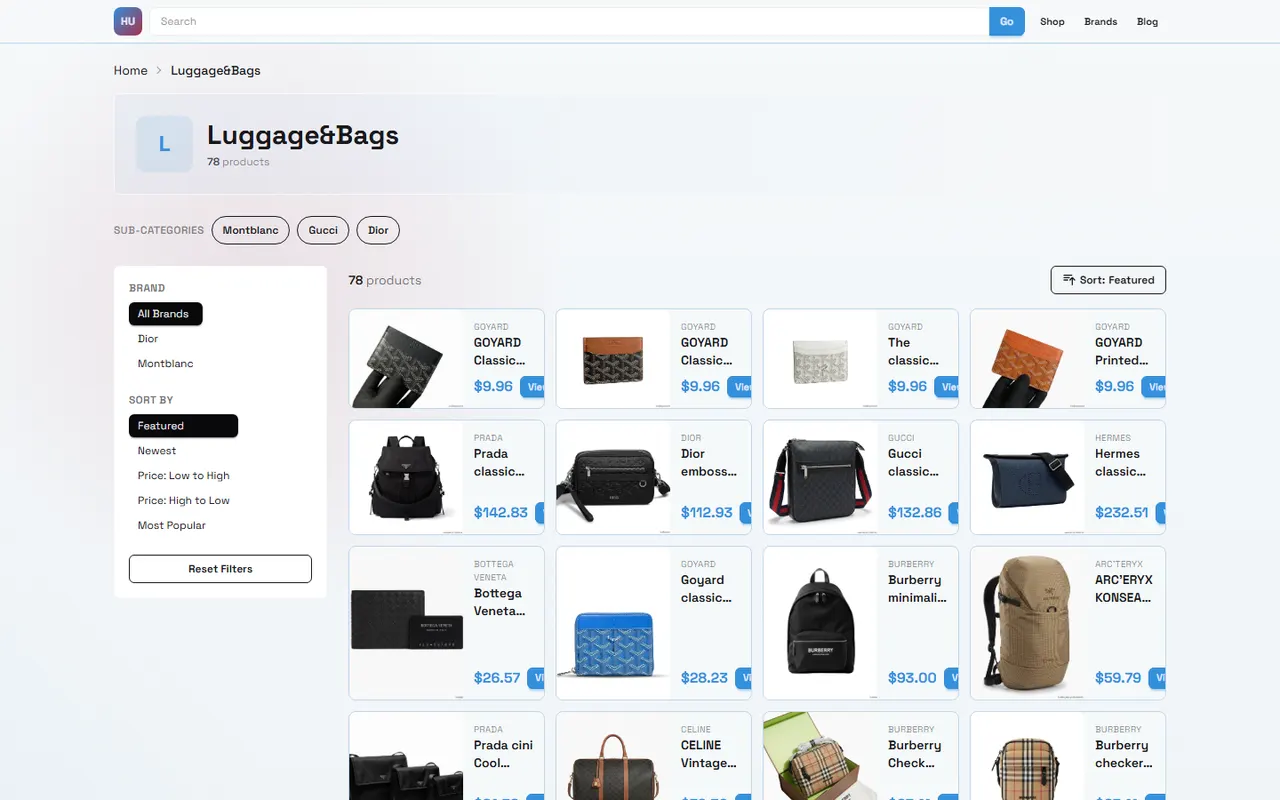
Image: Browsing commuter bag brands and organizing candidates
If you're looking for a commuter bag that can hold a laptop, charger, and daily essentials, the biggest problem isn't "more brands, better"; it's that you can't match the brand entries, product cards, and your own filtering criteria on the website.
This article addresses one specific task: browsing commuter bag brands on hubbuycnspreadsheet.org and organizing brand leads worth further verification into Google Sheets. After reading, you should be able to create a candidate table with columns for brand, laptop size, capacity, organizational structure, shoulder straps, closure type, and link status.
This content is suitable for readers who haven't decided on a specific model and want to compare brand directions first. It is not meant to replace verification of product detail pages, seller information, inventory, price, shipping, or return/exchange policies. Product information, link status, and costs may change, so before placing an order, you should re-confirm based on your destination country, currency, and purchase date. 🧭
First Determine Laptop Commute or Daily Carry Task
Don't start with "which brand is best." Whether a commuter bag is suitable depends on the items you carry daily and your usage environment.
Start by writing down the following:
Laptop size, e.g., 13-inch, 14-inch, 15.6-inch, or larger
Whether you need to fit a tablet, folders, headphones, charger, and water bottle
Commute method: subway, cycling, walking, or driving
Whether you frequently travel between office and home
Whether you need quick access, luggage sleeve, or water-resistant design
Acceptable weight, shape, and carrying style
Laptop size cannot be judged solely by screen diagonal. Different models have different body length, width, corner shapes, and case thickness, so "fits 15.6-inch" should not be directly considered as definitely fitting your laptop. A safer approach is to record the actual length, width, and thickness of your laptop, and compare them with the sleeve or laptop compartment dimensions in the product details.
Daily carry tasks focus more on capacity allocation. If you only need a phone, wallet, keys, and a thin jacket, an oversized bag may add unnecessary weight; if you also need to carry a lunch box, camera, or sports gear, a small commuter bag may leave the main compartment constantly crowded. 📏
Browsing Brands and Card Entries on hubbuycn Website Spreadsheet
The platform positioning of hubbuycnspreadsheet.org is to organize product leads in a website-based spreadsheet. When browsing, you can first treat it as a filterable product catalog, not a brand certification list that has completed purchase decisions.
Recommended browsing order:
First enter categories, brand columns, or product collections related to backpacks or commuter carry.
Check whether the brand name is clearly displayed on the card or table field.
Open the product card to confirm whether there is a product name, image, specification summary, or accessible product entry.
Record the brand name and product link; do not save only the search results page or category page address.
Mark items that need further confirmation as pending verification, such as laptop size, capacity, material, and closure type.
The brand column helps you aggregate products under the same brand or brand lead. It cannot automatically prove brand authorization, product authenticity, quality grade, or after-sales scope. If the brand name only appears in images, title abbreviations, or seller-customized text, it's best to record the identification status as "name to be confirmed."
The title and image on the product card are suitable for preliminary screening, but may not be sufficient to confirm the bag's actual capacity, sleeve dimensions, fabric composition, or waterproof rating. Especially model photos and display images may only show appearance, not internal structure. 🔎
How to Set Up Brand, Capacity, and Organization Fields in Google Sheets
Google Sheets is suitable for saving your comparison process because you can continuously add specifications, apply filters, and update status after rechecking links.
Recommended fields:
Brand
Product name
Product link
Source page
Laptop compartment dimensions
Laptop size description
Estimated capacity or page-listed capacity
Number of main compartments
Internal organization
External pockets
Shoulder strap and back panel information
Closure type
Material description
Water-resistant or waterproof description
Product price and currency
Stock status
Destination country suitability
Last verification date
Verification status
Notes
Do not mix "capacity" and "dimensions" in one column. Product pages may only provide length, width, height, or only liters; if one is missing, keep "not stated" and do not calculate it yourself and write it as page fact.
"Verification status" can use three simple levels:
Initial discovery: only catalog or card-level information
Specifications to confirm: entered product page, but key fields still missing
Ready for purchase evaluation: product name, link, and main specifications have been verified as of current date
If the page cannot open, redirects, shows only tag lists, or has no clear product name and usable information, do not record it as a valid product page. You can keep the link in notes, but status should be "unverifiable" or "not a product page."
Step-by-Step Comparison of Website Brand Page and Spreadsheet Filters
Website browsing and Google Sheets organization serve different purposes. The website is good for discovering leads, while the spreadsheet is good for comparing multiple leads in the same fields.
Comparison Item | hubbuycn Website Browsing | Google Sheets Organization |
|---|---|---|
Main purpose | Discover brands and product entries | Unify fields and filter candidates |
Information source | Page cards, brand columns, product detail entries | Information you recorded and verified |
Suitable actions | Open pages, view images, enter details | Sort, filter, mark missing fields |
Main risks | Card information incomplete or links change | Mistaking unverified content for confirmed facts |
In practice, you can first collect a few relevant candidates on the website, then copy them into Google Sheets. Don't add all brands to the table at once, otherwise missing fields will quickly increase and it will be hard to judge which products are truly worth comparing.
A more reliable filtering order:
First exclude candidates that are clearly unsuitable based on laptop size.
Then check whether the main compartment and laptop compartment meet your carry task.
Check whether the bag's empty weight, shoulder straps, and back panel descriptions are complete.
Compare closure type and quick-access needs.
Finally verify price, stock, shipping, destination restrictions, and after-sales conditions.
Price alone cannot determine which one is more cost-effective. Final cost may include international shipping, warehousing or handling fees, destination taxes, and possible return/exchange costs. Without current page and destination information, you should not call a certain brand or product "most economical." 💰
Organizing Brand Leads by Laptop Size, Shoulder Straps, Closure, and Organization
After initial entry, you can organize brand leads using four sets of fields.
Laptop Size
Prioritize recording the laptop compartment dimensions clearly stated on the page, not just "fits office" or "fits large laptop." If only screen size is given, note that it is page nominal information and compare again with the actual laptop body dimensions.
If you use a thick protective case, it's best to add a separate "case allowance" note in the table. Just because the compartment fits the bare laptop doesn't mean it's still convenient to remove after putting it in the case.
Shoulder Straps and Back Panel
For long commutes, shoulder strap width, padding, adjustment range, and back panel structure may be more important than appearance. If the page doesn't specify, fill "not stated," and do not infer carrying comfort from model photos.
Model wearing photos can help you observe the relative size and appearance proportion of the bag, but cannot prove actual weight, strap softness, or long-term use experience. This article also does not write image observations as conclusions about touching materials or actual trial carrying.
Closure Type
Zippers, magnetic snaps, drawstrings, and flaps each have trade-offs. If you need to frequently access headphones, access cards, or charging cables during commute, the opening position and one-handed operation convenience are worth recording; if you often carry in crowded environments, pay attention to whether the opening is easily accessible to others.
For products without clear display of the opening structure, do not fill in specific conclusions based solely on words like "multifunctional" or "anti-theft" in the title. Anti-theft design, lock structure, and water resistance require direct support from page specifications or images.
Organization and Capacity
More compartments isn't always more practical. Too many small pockets may be convenient for categorization, but may reduce continuous space in the main compartment. You can divide your items into groups: laptop and documents, charging devices, daily small items, clothing or lunch, and then judge whether the organization helps with access.
If the page only shows appearance without internal photos or text descriptions, mark the internal structure as "to be confirmed." Do not deduce the number of compartments from the backpack's exterior shape, or infer actual capacity from promotional images.
When Images and Titles Are Insufficient to Confirm Brand Features
The following situations are not suitable for drawing definite conclusions:
Title only has color, style, or purpose, without clear brand name
Brand name appears with different spellings on different pages without official explanation
Images show combined scenes, cannot confirm whether the backpack includes other accessories
Detail page lacks key fields such as laptop compartment, capacity, or material
Images and titles have inconsistencies in style, color, or size
Page link redirects to category page, blank page, or inaccessible address
Product images contain different versions, but page does not explain differences
In such cases, you can keep the candidate in the table, but should lower the verification status and record questions that need further confirmation from the seller or platform. Images in this article are only to help understand the browsing and organizing task, not proof of specific product quality, brand authorization, or physical condition.
Verification Boundaries for Links, Specifications, and Update Times
Product pages are high-volatility information. Brand name, price, stock, specifications, shipping, after-sales policy, and link status may change, so the table must include "last verification date."
Each time you prepare to continue purchase evaluation, at least recheck the following:
Does the product link still point to a specific product page?
Is the product name consistent with the record?
Have images, colors, and size options changed?
Are laptop compartment and capacity fields still visible?
Is price and currency clear?
Does it show stock or availability?
How are destination shipping, freight, and possible taxes calculated?
Are return/exchange conditions and time windows applicable?
"Ready for purchase evaluation" does not mean "suitable for everyone to buy." It only means the current record has the basic information needed to continue comparison. Before ordering, you still need to check seller, order terms, delivery address, and destination import restrictions. Do not handle customs issues by under-declaring, splitting orders to avoid taxes, or circumventing inspections; follow destination country rules and declare truthfully with required documents. 🧾
Suitable Scenarios for Website Browsing vs Spreadsheet Maintenance
If you have no candidate brands yet, prioritize using hubbuycnspreadsheet.org to browse brand columns and product cards. This helps you first understand what directions are available for further verification.
If you have already saved multiple product links, Google Sheets is better for subsequent organization. You can filter by laptop size, capacity, verification status, or update time, and quickly find candidates missing key fields.
When combining both, keep "discovery" and "confirmation" separate:
Website records are for discovering brands and product entries
Spreadsheet records are for unifying fields and comparison conditions
Product page verification is for confirming currently visible facts
Pre-purchase checks are for confirming price, logistics, taxes, and after-sales boundaries
This reduces the risk of writing early impressions as final conclusions and makes it easier to update records after product page changes.
Next Steps After Completing the Brand Candidate Table
When your table has several candidates, don't decide based on brand name immediately. First filter out products that meet actual tasks, then list missing information as a question list.
Recommended next steps in order:
Delete candidates that clearly do not meet laptop size or carry task.
Mark products without clear laptop compartment, capacity, or closure descriptions.
Reopen remaining product pages to confirm links and product names are still valid.
Record price, currency, stock, and last verification date.
Check shipping, taxes, import restrictions, and after-sales conditions according to destination country.
Only proceed to ordering or further inquiry after key specifications and purchase boundaries are clear.
The final brand candidate table should not be just "brand name plus link," but should answer three questions: Can this bag fulfill your carry task, which facts have been verified, and which risks still need confirmation before purchase.
If you just want to quickly find a bag that can hold a laptop, filter by laptop compartment size and carrying conditions first; if you want to compare multiple brands, keep complete specs, links, and update times. For brand features that cannot be confirmed, it's better to leave blank and mark as pending verification, rather than infer definite conclusions from titles or images.
Agent Platform Shopping FAQ
1. For hubbuycnspreadsheet.org, what drawbacks make Google Sheets an unsuitable choice for product listings?
When product counts grow large on hubbuycnspreadsheet.org, Google Sheets struggles to maintain acceptable performance. Loading times stretch out, and the overall system becomes laggy and unresponsive. Mobile users have an especially rough experience, with a cluttered display that makes searching for specific items a hassle. By switching to the hubbuycnspreadsheet.org website spreadsheet, you get noticeably quicker load times and a much cleaner, more user-friendly interface for the exact same product set.
2. Which platform should hubbuycnspreadsheet.org users turn to for the most valuable coupon offers?
For shoppers on hubbuycnspreadsheet.org looking for the best coupon savings, Kakobuy stands out right now. They're offering a $15 discount code that works with no minimum spend threshold, which is fantastic for anyone ordering smaller packages. Just enter the promo code kakobuy888 at checkout.
Browse our latest products and find your next favorite item.